

Your most social media-savvy customers, the ones with the biggest following, can be among your best advocates. The Extole Influencer Program gives them a place to apply, personalized codes and links to share, automatic rewards, and a dashboard to track results, while you manage it all from the Extole Admin Tool.
The program covers five areas:
- Personalized influencer codes and links
- Automation of influencer rewards
- Influencer discovery
- A comprehensive influencer portal
- Dynamic and transparent reporting
If you are new to customer-led growth, see how a refer-a-friend program works, or read how your existing customers can solve your influencer marketing challenges.
Key program features
Influencer Portal
The Influencer Portal is the hub where influencers interact with your program, starting with the application process. Once verified and approved, influencers can log into the portal to view their dashboard and to share links and codes with their networks.
Application Experience
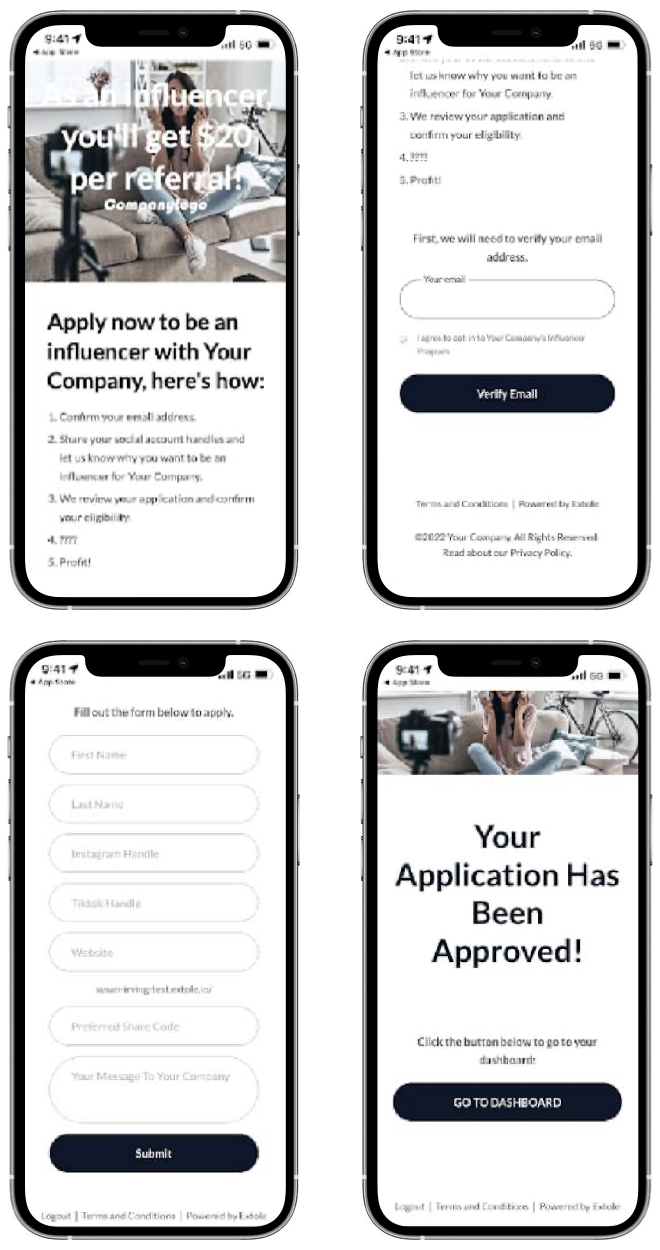
The Application Experience is a user's entry point to the Influencer Portal.
First, the potential influencer is prompted to enter their email for verification purposes, triggering the Authentication Email. After clicking the link in the Authentication Email, potential influencers can then submit their application to the program. The application is customizable but by default includes fields for first and last name, social media accounts, and an application message.
Influencer Dashboard
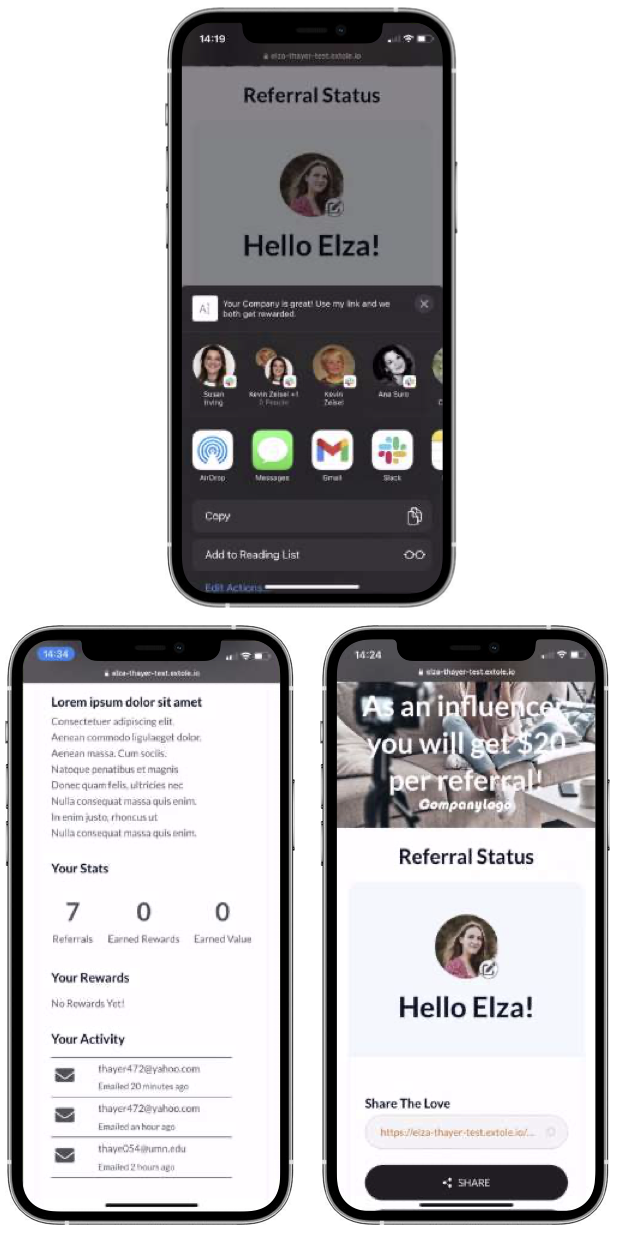
An influencer can access their personal dashboard through the portal once their application has been approved. Each time an influencer logs in through the portal, they will see the following:
- Their profile picture display, where they can choose to upload an image from their computer or mobile device
- Their number of referrals and earned rewards as well as earned value (total value of all rewards earned)
- A "Your rewards" feed, which includes reward type and value
- A "Your activity" feed, which displays share instances and channel information
Share Experience
When an approved influencer logs into the portal and decides to share, they can use the Share Experience embedded directly on their dashboard. Influencers have several share options to choose from by default:
- Copy the share link to post wherever they want
- Share natively using any installed apps on their mobile device
- Share via email
- Select a specific social channel to share from
Approval Methods
Auto-approval. In the Application Experience, you can choose to enable an automatic approval process (on by default). Enabling this method means that all potential influencers who submit applications will automatically be approved and receive the Application Approval Email.
Manual approval. If auto-approval is disabled, you can approve influencers by creating one-off or batch approval events. Once the approval event is created, the influencer or influencers will receive the Application Approval Email.
Emails
Authentication Email
The Authentication Email is sent to a potential influencer who has entered their email in the first part of the Application Experience. This message verifies their identity and contains a link to apply for the program.
Application Received Email
The Application Received Email is sent once an influencer has completed and submitted their application. This email provides a summary of the fields they entered.
Influencer Welcome Email
The Influencer Welcome Email can be used to invite prospective influencers or welcome approved influencers to your program. It includes a personal share link as well as a link to the Influencer Portal. If auto-approval is enabled, influencers receive this email immediately after submitting their application. For manual approval, influencers receive the email after an approval event has been created. If your program excludes the Application Experience, you can send this email when you invite influencers individually or via batch file.
Application Declined Email
The Application Declined Email is sent when a potential influencer's application has been manually declined. This email may include a link to your standard refer-a-friend program to encourage the influencer to participate in that program.
Has Not Influenced Remind Email
The Has Not Influenced Remind Email is sent to influencers who have been inactive for a specified period of time, from the Audiences section of the Extole Admin Tool or via batch file. The scheduled version of this email lets you specify the number of days influencers have been inactive before the email is sent (default 7).
Stats Email
The Stats Email is sent to approved influencers after successful referrals and can also be configured to send on a drip schedule. The message contains a link to the Influencer Portal and encourages influencers to log in and share or check their Influencer Dashboard.
Friend Share Email
Friends receive the Share Email when an influencer decides to share via the email channel from the Share Experience. This email includes the influencer's personal share link or code.
Advocate Earned Reward Email
Once an influencer drives a conversion, they receive the Earned Reward Email. The message may contain information about the company or brand for which the reward was earned, the value of the reward, instructions on how to redeem the reward, and a call to action to continue sharing.
Friend Landing Experience
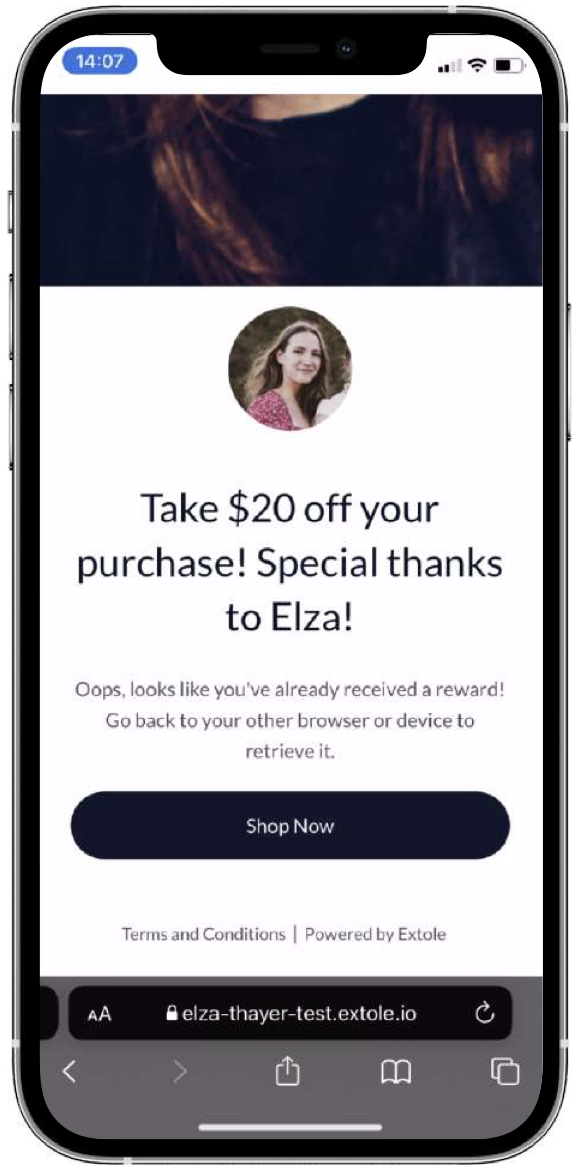
When a consumer clicks on an influencer's share link, they arrive on the Friend Landing Experience. This page features the influencer's name and profile image, delivers any reward earned, and encourages the visitor to shop.
Extole Admin Tool features
Influencer Program Dashboard
Add/Edit an Influencer
Through Influencer Program dashboards, you can add or edit influencers. The form allows you to enter the influencer's first and last name, email address, share link, and personal share code. You can also enable the Invite Email to send automatically to the influencer once they have been created.
Customize Share Links Report
The reports that power the displays on new Influencer Program dashboards can be customized. Additionally, the influencer table data is now backed by reports, which means it is no longer retail-specific and will match your configured business events.
See the Influencer Program in action
Experience Extole for yourself. Request a demo to see how an influencer program can turn your most social customers into a growth channel, or explore influencer and ambassador programs.